Cross-tool guide · Prompt and preset routes
My Ride Is Here Prompt Guide
Use the copyable prompt when a general AI video model expects text plus a reference photo. Use this site's prepared action when you want the same shot without writing or tuning a prompt.
A useful My Ride Is Here prompt specifies the vertical car-window viewpoint, one reference-photo rider, one broom, matched car speed, one acknowledgement beat, a clear departure, continuous parallax, and exclusions for duplicates or repeated entrances.
Base prompt
Copy the complete My Ride Is Here prompt
Not cross-model tested
Vertical 9:16 phone video filmed from inside a moving car on an ordinary suburban road. One rider based on the reference photo travels beside the passenger window on one wooden broom at car-window height. Keep a readable side profile and natural body-to-broom contact. The rider looks toward the camera once, then continues ahead through the intersection and flies away. Continuous road motion and parallax, realistic daylight, slight handheld movement, one uninterrupted take. No extra rider, duplicate broom, text, logo, reset, repeated entrance, or second pass.
Paste it into a video model that accepts a reference photo or first frame. Select a short vertical output. Model interfaces, safety rules, duration choices, and reference controls differ, so adapt the setup to the current tool rather than assuming one universal button sequence. This wording is a documented starting point, not a performance claim.
Evidence boundary
Two accepted runs, one tested site preset
These person and pet results were made with the same prepared Parallel Commute action and both passed the site's recorded frame review. They verify the site pipeline and shot mechanics. They do not prove that the public text prompt works in every outside model.
TESTED · ACCEPTED RUN 01
Person · Parallel Commute
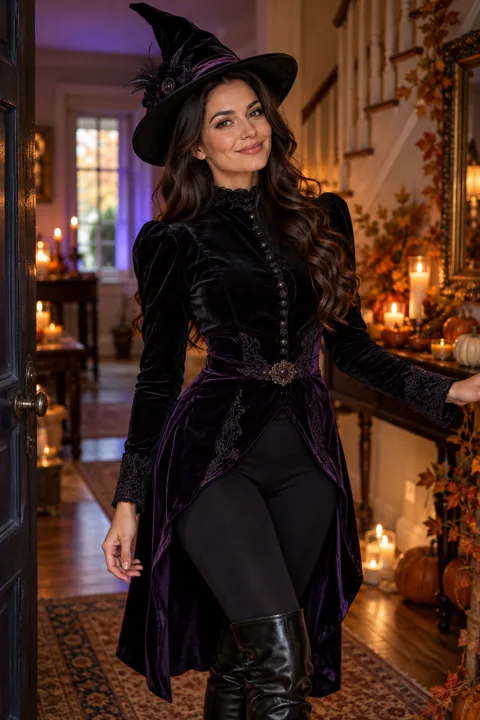
Observed: Clean side-window pass, one head turn, visible broom, then windshield departure.
TESTED · ACCEPTED RUN 02
Pet · Parallel Commute
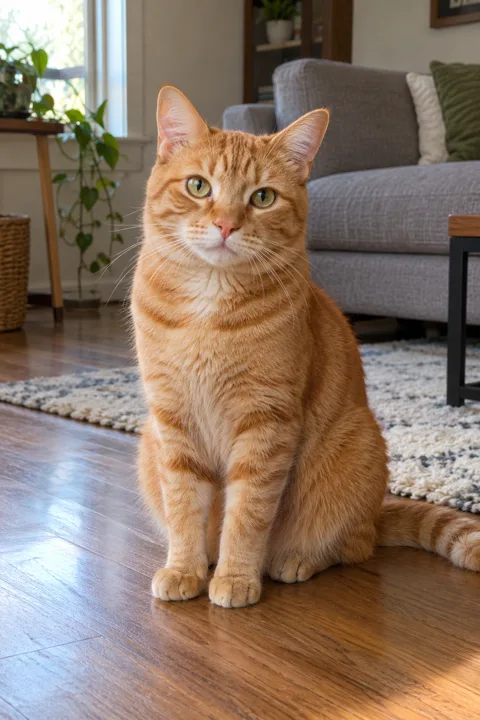
Observed: Visible broom and forepaw contact, side-window pass, then windshield departure.
Recorded settings for both runs
- Pipeline
- KIE · Nano Banana 2 reference · Wan 3.0 video
- Action reference
- Parallel Commute · exact six-second reference
- Requested output
- 9:16 · 480p · six-second target
- Accepted file
- 480 × 854 · 5.6 s · 30 fps · H.264 + AAC
- Reference strength
- Not exposed or recorded as a public control
- Review date
- October 24, 2026
The private action-reference clip is part of the site pipeline and is not redistributed. These runs do not test a prompt-only workflow.
Short version
Use a compact prompt when the interface has a tight limit
Not cross-model tested
Vertical phone video from inside a moving car. The reference-photo subject rides one wooden broom beside the passenger window at the same speed, looks toward the camera, then flies ahead. Continuous suburban road motion, realistic daylight, one take, one rider, no duplicate broom or repeated entrance.
The short version preserves the camera, subject, motion, acknowledgement, ending, continuity, and duplicate exclusions. It gives up optional atmosphere and styling detail first.
Procedure
Use the prompt without changing everything at once
- 01
Choose the source photo
Use one clear person or pet with a readable head, body, and natural light.
- 02
Set the format
Select 9:16 and a short duration that can hold one side-window pass and ending.
- 03
Paste the base prompt
Keep the first run close to the base version so you have a useful comparison.
- 04
Change one variable
Adjust wardrobe, weather, gesture, or ending separately instead of rewriting the whole shot.
- 05
Review continuity
Check identity, broom contact, matched speed, camera path, road motion, and the final departure.
Settings: tested record vs cross-tool starting point
| Control | Accepted site runs | Outside-tool starting point |
|---|---|---|
| Reference input | Subject photo plus private action-reference video | Use the authorized subject photo as the reference image or first frame; do not upload it twice unless the tool requires both slots. |
| Reference strength | Not exposed or recorded | Start at the model default or middle setting. Increase only if identity drifts; decrease if motion becomes rigid. |
| Duration | Six-second request; accepted files are 5.6 seconds | Choose 5–6 seconds for one approach, glance, and departure before attempting a longer sequence. |
| Camera motion | Locked to the Parallel Commute action reference | Ask for one passenger-window tracking shot and disable extra cuts or automatic scene changes when available. |
| Other controls | Provider pipeline defaults | Leave seed, guidance, and creativity at default for the first run; change one control after reviewing the failure. |
Outside-tool settings are conservative starting points, not tested universal values. Record the model name and settings with each run so comparisons remain meaningful.
Two routes
Choose a text prompt or a prepared broom action
| Decision | General prompt route | Broom Ride Studio preset |
|---|---|---|
| Setup | Reference photo plus written shot instructions | Reference photo plus selected action |
| Control | Broader wording changes, model permitting | Fixed road action and limited controls |
| Iteration | Tune prompt and settings | Retry the prepared action when needed |
| Evidence | Must be tested in the chosen model | Current person and pet samples passed site review |
| Best fit | Creators comparing models or inventing a new variation | Creators who want the car-window broom shot without prompt writing |
Need the complete photo workflow? Follow the step-by-step broom riding tutorial. If you are choosing between a template and this site, use the CapCut comparison.
Three complete starting points
Copy a full prompt, then test it in your chosen model
These are complete copyable plans rather than one-line swaps. None has been benchmarked across outside models; the status stays visible on every card.
Person · Everyday commute
Use with one authorized person photo
Vertical 9:16 phone video filmed from inside a moving car on an ordinary suburban road. One rider based on the reference photo travels beside the passenger window on one wooden broom at car-window height. Keep a readable side profile and natural body-to-broom contact. The rider looks toward the camera once, then continues ahead through the intersection and flies away. Continuous road motion and parallax, realistic daylight, slight handheld movement, one uninterrupted take. No extra rider, duplicate broom, text, logo, reset, repeated entrance, or second pass.
Pet · Low broom ride
Use with one authorized pet photo
Vertical 9:16 phone video filmed from inside a moving car on an ordinary suburban road. The pet from the reference photo is the only subject and rides low on one wooden broom beside the passenger window at car-window height. Keep the pet's face, coat markings, body proportions, and forepaws recognizable, with stable body-to-broom contact. The pet turns toward the camera once, then continues ahead through the intersection and flies away. Continuous road motion and parallax, realistic daylight, slight handheld movement, one uninterrupted take. No person, costume, extra animal, duplicate broom, extra limbs, text, logo, reset, repeated entrance, or second pass.
Person · Rainy night
Use after the daylight baseline is stable
Vertical 9:16 phone video filmed from inside a moving car on a quiet suburban road at night. One rider based on the reference photo travels beside the passenger window on one rigid wooden broom at car-window height. Preserve the rider's face, clothing, seated posture, and hand-to-broom contact. Light rain, wet-road reflections, and ordinary headlights remain consistent while the rider looks toward the camera once and then flies ahead. Continuous road motion and parallax, subtle handheld movement, one uninterrupted take. No lightning, castle, giant moon, extra rider, duplicate broom, floating torso, text, logo, cut, reset, repeated entrance, or second pass.
Current site-preset status: Parallel Commute is tested with the two accepted runs above. Flyby Sign Gag is not tested under the current action-contract revision, so this page does not present it as a verified prompt or output.
Repair prompts
Match the visible failure to one corrective sentence
Keep the original prompt and add only the matching sentence. If the next run improves, preserve that change before testing another one.
Rider detaches from the broom
Add this repair sentence
“Keep the rider's hips seated on the broom and both hands or forepaws in stable contact with the same rigid broom for the entire shot; remove the wave.”
A second rider, broom, or extra limb appears
Add this repair sentence
“Show exactly one subject and one complete wooden broom; no duplicate body, duplicate handle, extra limb, reflection copy, or background rider.”
The rider hovers while the road moves
Add this repair sentence
“The rider and car travel in the same direction at matching speed for the side-window beat, with continuous road parallax and no stationary hovering.”
The entrance repeats or the camera cuts
Add this repair sentence
“Use one uninterrupted passenger-window tracking shot: one arrival, one glance, one forward departure, no cut, reset, loop, second pass, or new camera angle.”
Face, coat, or outfit drifts
Add this repair sentence
“Preserve the reference subject's face, hairstyle or coat markings, clothing, colors, and body proportions unchanged in every frame.”
The clip stops before the joke resolves
Add this repair sentence
“Reserve the final second for a clean forward departure through the intersection; the rider becomes smaller with distance and does not vanish or restart.”
Questions
My Ride Is Here prompt questions
Do I need a prompt on Broom Ride Studio?
No. This site uses prepared action references. Choose a preset and upload the subject photo; the copyable prompt is for general AI video tools.
What aspect ratio should I use?
Use 9:16 for the familiar phone-video composition unless your publishing destination needs another format.
Should I describe the person's face and clothes?
Let the reference photo carry identity and clothing when the model supports image guidance. Repeating visual traits in text can introduce conflicts.
Can I add a witch costume?
Yes. Change only the wardrobe line first, then compare the result before changing the road, gesture, camera, and ending at the same time.
How do I make the broom crash version?
Replace the clean fly-away with one brief, stylized roadside sign gag. Avoid graphic injury and keep the event readable as fiction.
Why does the rider drift or hover?
State that the broom rider travels beside the car at the same speed, and preserve continuous road motion and parallax.
Which prompts on this page are tested?
The Parallel Commute preset has two accepted 480p site runs, one person and one pet. The public copy-and-paste prompts have not been benchmarked across outside models and are labeled Not cross-model tested.
What reference strength should I use?
This site's accepted runs did not expose a public reference-strength control. In another tool, begin with its default or middle setting and change one control at a time; a universal numeric value would be unsupported.
Verification method
How this public prompt was derived — and what remains untested
Prompt tutorial
Observed: The page publishes a copyable prompt, scene guidance, and a separate generator route. Does not establish: that its wording is original, optimal, or effective in every model.
Shot reference
Observed: The clip shows the roadside glide and one-rider shot grammar described by the prompt. Does not establish: that a text prompt alone produced the original clip.
Site evidence
Observed: The site's Parallel Commute pipeline produced two accepted 480p runs: one person and one pet. Both were reviewed for a single subject, visible broom contact, the side-window beat, and a clean departure. Does not establish: that any public prompt was benchmarked across third-party models, or that the current Flyby Sign Gag contract is verified.
These observations confirm visible page content and shot mechanics on the stated review dates. They do not establish search volume, ranking, prompt authorship, or universal performance across video models.