Same generator
The workspace above is the homepage tool, with the same upload, action, quality, consent, credit, and result flow.
The real Broom Ride Studio tool
Turn one authorized person or pet photo into a vertical broom ride. Choose the action and quality below—no written prompt, costume, or background upload required.
Open the generatorBroom Ride Studio Generator
For the best result
480p · 6 seconds · 9:16 MP4 · AI-generated sound
Your photo stays in this browser until you start. Sign in to upload it privately. Photos are scheduled for deletion after 24 hours.
The actual product
The workspace above is the homepage tool, with the same upload, action, quality, consent, credit, and result flow.
Choose Person or Pet and upload one clear image. The product does not ask for a costume, broom prop, or background image.
Parallel Commute and Flyby Sign Gag use fixed six-second action references rather than a free-form scene prompt.
Generated motion and anatomy can vary. Watch the entire result and label AI-generated scenes clearly when you post.
Current accepted samples
These are current Broom Ride Studio samples for Parallel Commute—not third-party trend clips. They show the kind of framing the product has accepted, not a guarantee that every photo will produce identical motion.
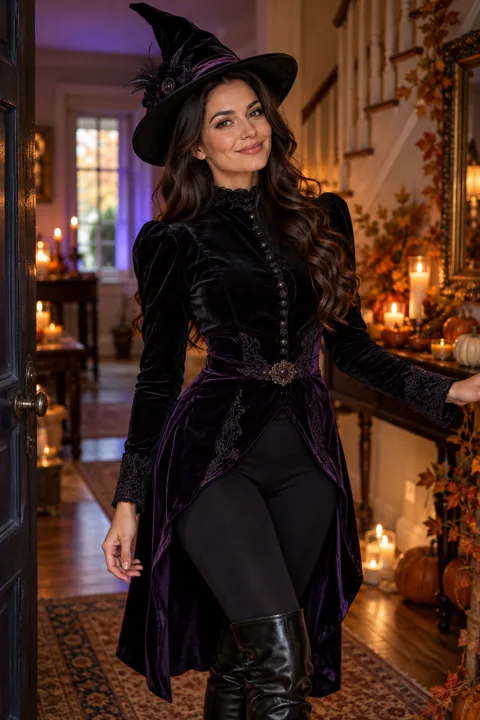
Input on the left, accepted result on the right.
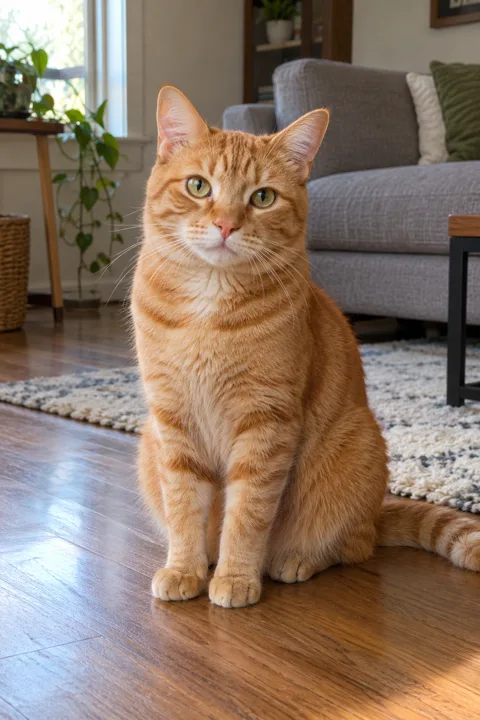
Pet anatomy is harder; inspect paws and broom contact.
Choose an action
The choice changes the reference action and ending. It is not a background, costume, or visual-style selector.
Ride beside the car, then fly away.
Target: 6 seconds · vertical video
Fly past the car into a comic sign collision.
Target: 6 seconds · vertical video
Prepare one photo
Use one person or one pet. Avoid groups, collages, and a subject hidden behind objects.
Choose a sharp, well-lit image with the face and body easy to distinguish. An ordinary pose is fine.
Use your own photo or one you are authorized to use, then confirm consent in the workspace.
Workflow
Match the subject category to the photo you will upload.
Select Parallel Commute or Flyby Sign Gag.
10 credits at 480p or 20 credits at 720p.
Confirm permission, submit, then watch the complete result before download or sharing.
Need more help? Follow the step-by-step broom riding tutorial.
Review checklist
The subject stays recognizable through the whole shot.
Hands or paws maintain believable contact with the broom.
The scene contains one subject and one consistent broom.
The action follows the selected ending without a confusing reset.
No unexpected text, logo, watermark, or graphic injury appears.
The result is labeled as AI-generated when shared publicly.
Questions
It is the same Broom Ride Studio generator used on the homepage. This page does not use a separate model, editor, or Halloween-effects product.
Upload one clear photo of one person or one pet that you have permission to use. Illustrated characters and group photos are not supported input categories.
Choose Parallel Commute for a ride beside the car followed by a fly-away, or Flyby Sign Gag for a comic roadside-sign ending.
No. Use an ordinary subject photo. The selected action supplies the moving-road scene and broom; there is no separate costume or background control.
Both current actions target a six-second vertical video with generated sound. Results can vary, so review the complete MP4 before sharing it.
The current tool shows the exact charge before submission: 10 credits for 480p or 20 credits for 720p.
Product evidence
The generator at the top exposes the current subject, action, quality, consent, credit, and result controls used by this site.
The person and pet pairs above document accepted Parallel Commute inputs and outputs. They do not prove identical results for every photo.
The supported categories and controls come from the current product configuration. Costume, custom background, and free-form prompt controls are not claimed because they are not offered.
Make your ride
Start with one authorized person or pet photo, choose the action and quality, then review the generated video before sharing.