One everyday photo · one broom-riding video

Broom Riding Trend AI Video Generator

Turn one everyday photo of a person or pet into a vertical broom ride. Choose the template, upload a photo and generate without writing a prompt.

AI result
AI result
AI result

Swipe to see each ride.

Broom Ride Studio Generator

Make your broom-riding video

6s · 9:16 · MP4
1. Choose your ride

Each template guides the road scene and riding sequence. Wan 3.0 generates new sound with your video.

For the best result

  • One person or one pet in a clear, well-lit photo
  • Keep the face and enough of the body visible
  • Use an everyday photo — no broom or riding pose needed
2. Upload one everyday photo
3. Choose quality

480p · 6 seconds · 9:16 MP4 · AI-generated sound

Your photo stays in this browser until you start. Sign in to upload it privately. Photos are scheduled for deletion after 24 hours.

How to make a broom riding trend video

Three steps, one everyday photo and no background upload.

  1. 01

    Select your template

    Choose either 6-second template: Parallel Commute or Flyby Sign Gag.

  2. 02

    Upload one photo

    Pick Person or Pet, then upload one clear photo. The road scene and broom are built into the selected template.

  3. 03

    Generate and review

    Choose 480p or 720p, confirm photo permission, generate the MP4 and watch it before sharing.

What is the broom riding trend?

Parallel Commute example
AI-generated Parallel Commute example. See a reference post on TikTok. Watch on TikTok

The “my ride is here” joke swaps an ordinary pickup for a flying broom. From inside a moving car, someone riding a broom appears on a normal suburban road as if this were their everyday commute. Our two templates give that same absurd sighting different endings.

01

The setup

A car-window view and an ordinary street make the impossible ride feel like a chance encounter.

02

Parallel Commute

The rider keeps pace beside the passenger window, glances back, then flies ahead and away.

03

Flyby Sign Gag

The rider approaches, passes the car and finishes with a comic bump into a roadside sign.

Watch the sign-gag reference on TikTok

Broom Ride Studio creates a new AI video from a photo you are allowed to use. It is independent of TikTok, CapCut and the creators of the original posts.

Choose your template

Broom Ride Studio Pricing

Four one-time pack options · No subscription

Compare the one-time USD packs, choose the credits you need, and review checkout with PayPal.

View full pricing and credit rules
Choose your video pack

Standard Video · USD 6.99

20 credits · 1 HD 720p video · no subscription

By paying, you agree to our Terms. Unused-pack refund policy. Adult payer required.

Video format and credit cost
VideoOutputCredits per video
Standard · 480p6s vertical MP410
HD · 720p6s vertical MP420

Select a one-time pack to review checkout with PayPal. Payment adds credits to your account; generating a video is a separate action.

Failed render or serious result issue

AI video results can vary in motion, identity, clothing and background details. Review a completed result before sharing it.

Read the service terms

Permissions and sharing

Before publishing, check the platform’s rules and the permissions needed for your intended use.

Real input-to-output example

Broom riding examples: photo in, video out

See the photo and selected template behind one Standard 480p result. The three videos at the top show more accepted rides.

Photo to video example

The cat's sign gag

1 photo · 1 template · 1 video

Your photo + selected template

You upload one pet photo. Flyby Sign Gag supplies the road sequence.
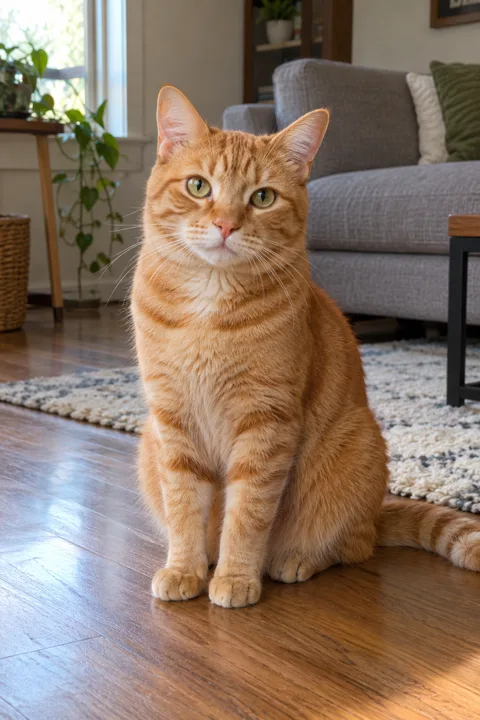
Orange tabby used for this output
Your upload · pet photo

Preset by us

Flyby Sign Gag

Moving car, close flyby and harmless sign ending.

AI result

Earlier 10-second Standard 480p example. New Flyby Sign Gag videos target 6 seconds and can vary.

Broom Ride Studio vs CapCut template

Use Broom Ride Studio to generate a new ride from one photo and a fixed action preset. A CapCut template gives you the edit and media slots supplied by its creator.

Preset advantage

Broom Ride Studio

Action
Parallel commute or sign-area gag
Subject
One person or pet photo
Setting
Built-in suburban road
Output
6s vertical MP4
Setup
Select template, upload photo, generate
Best for
Creating this specific trend from your own photo

Comparison

CapCut template

Action
Defined by the chosen template
Subject
Depends on its replaceable media slots
Setting
Depends on the template or your edit
Output
Length and export options vary
Setup
Find a template and add its required media
Best for
Using a specific edit or a timeline

Photo requirements, output and result limits

A clear everyday photo helps the rider remain recognizable. Faces, anatomy, broom contact and road motion can still vary between renders.

See photo requirements and result limits

Before you upload

Use one permitted, well-lit photo of a person or pet with the face and body visible. Avoid heavy filters, group photos and blocked faces.

Before you share

Review identity, body shape, broom contact, background continuity and platform disclosure requirements. AI-generated details may differ from the input.

Before you start

Broom riding trend FAQ

What is the broom riding trend?

It is a short-form Halloween joke where a broom rider appears on an ordinary road as if flying were a normal commute. Our Parallel Commute template ends with a fly-away; Flyby Sign Gag ends with a comic roadside sign bump.

What photo should I use?

Use one clear, well-lit photo of one consenting person or one pet. Keep the face and body visible. An everyday pose is fine; you do not need a broom in the photo.

Can I use a pet or illustrated character?

Choose Person or Pet before uploading. Ordinary pet photos work without costumes or props. Illustrated characters are not a supported input category.

What scene will the video use?

Both templates provide a suburban road and a moving-car viewpoint. Choose the ride you want; you do not need to upload a separate background image.

How long is the video?

New videos from both templates target 6 seconds, with vertical 9:16 framing and newly generated sound. The examples include earlier accepted clips that may run longer.

Is this connected to TikTok or CapCut?

No. Broom Ride Studio is an independent website. Public social videos were studied as references, but they are not presented as results generated by this site.

Broom Ride Studio

Your ride is here.

Choose a template, upload one person or pet photo and create your broom-riding video.